
Service Desk AI Copilot
AI-powered triage and resolution for faster, smarter IT support

Summary
The Service Desk AI Copilot empowers IT service desk leads and agents by automating ticket triage, prioritization, and routing while providing root-cause insights and guided responses. By analyzing incoming tickets, correlating them with historical incidents and logs, and suggesting actionable remediation steps, this tool reduces resolution time and enhances service consistency—all while keeping human agents in control.
Business Problem & Value
IT service desks often struggle with high ticket volumes, repetitive tasks, and inconsistent resolution times. This AI copilot addresses these challenges by automating initial triage, surfacing relevant knowledge, and suggesting fixes, enabling agents to resolve issues faster and focus on complex or high-value decisions. The result is improved efficiency, higher first-contact resolution rates, and a better user experience.
Steps to Build
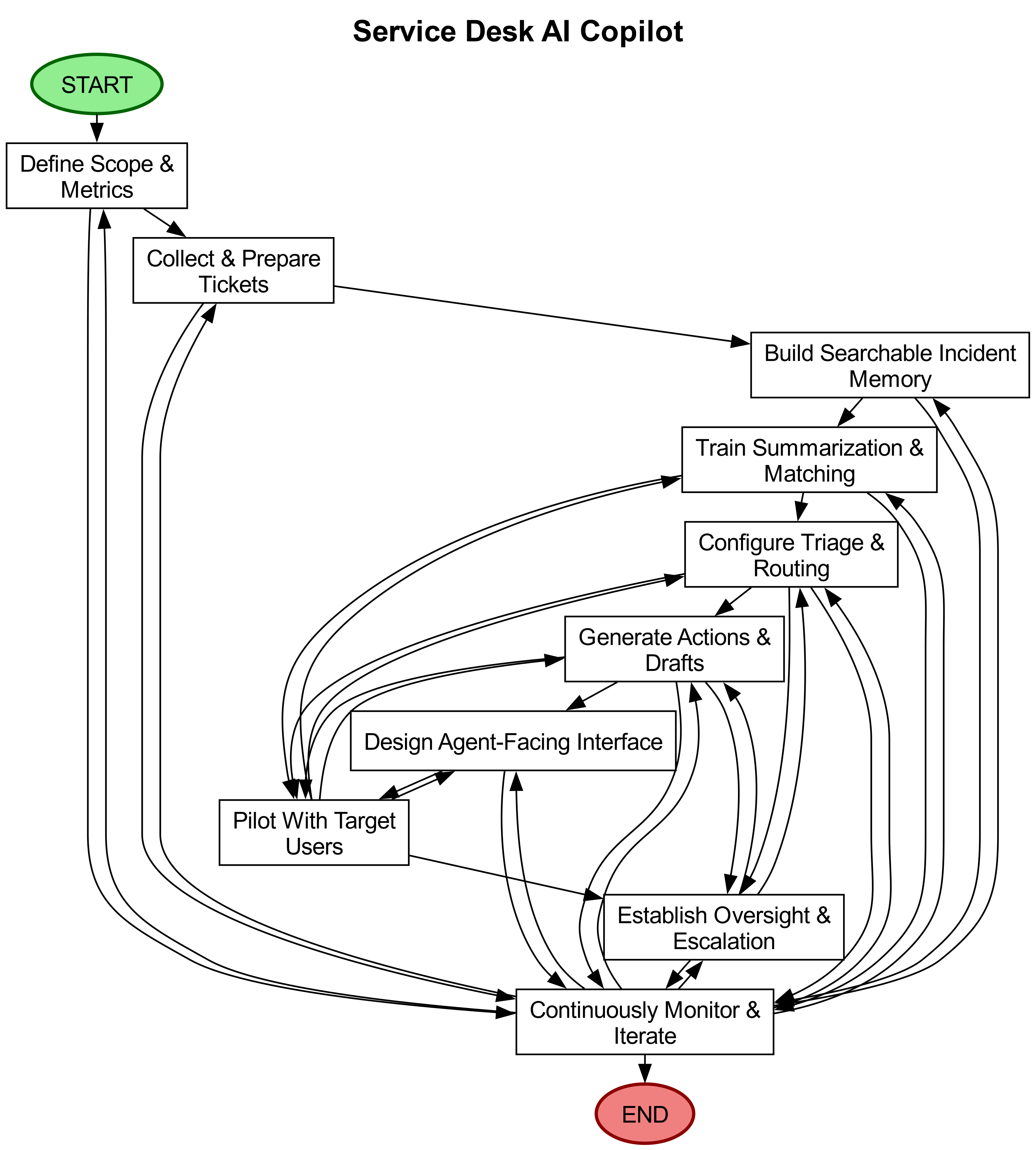
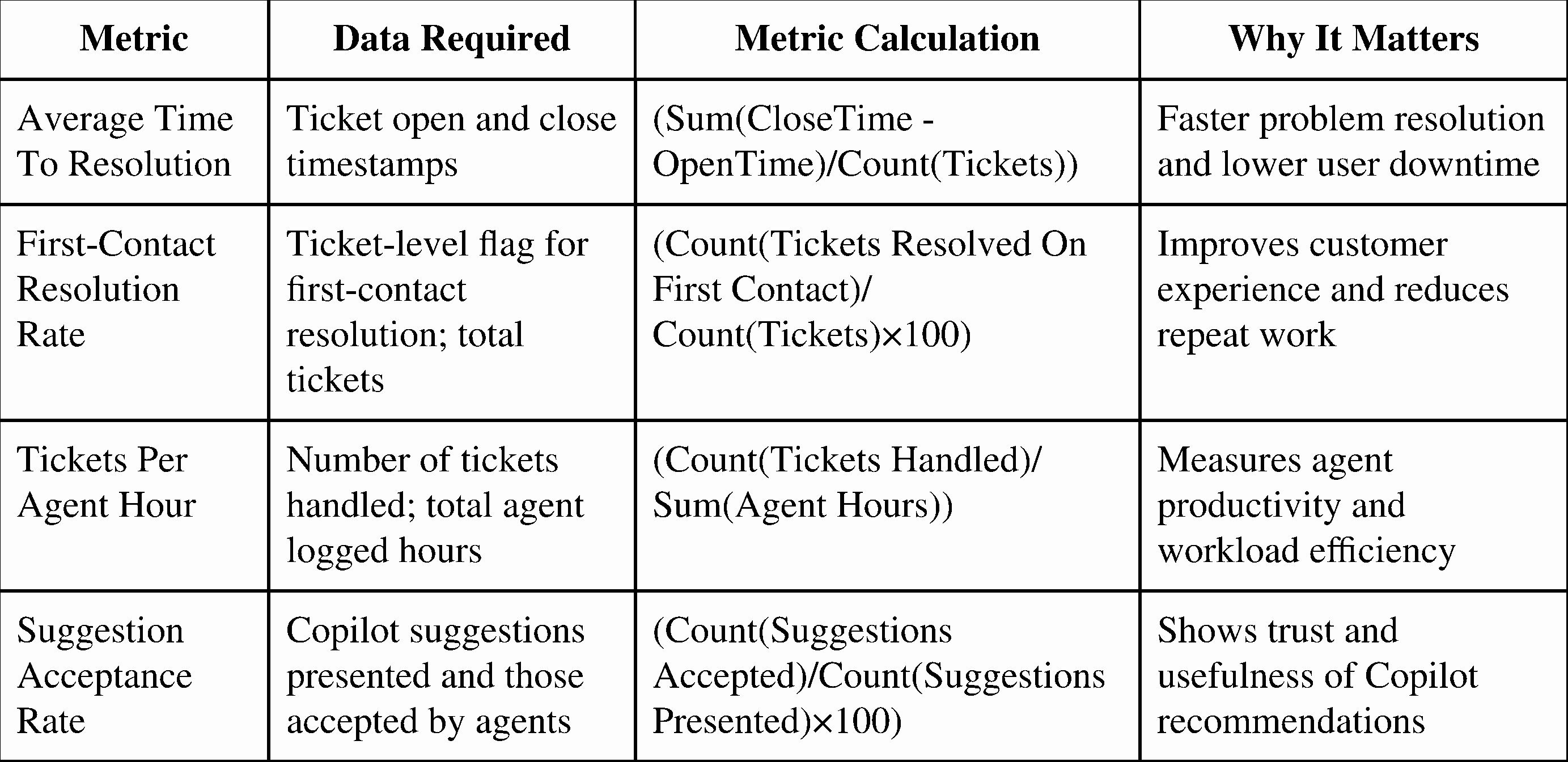
Define scope and success metrics: Identify which ticket categories (e.g., password resets, network outages) the Copilot will handle first, and set measurable goals such as reducing average resolution time by a target percentage or increasing first-contact resolution rates.
Gather and prepare past tickets and related records: Collect historical tickets, incident reports, resolution notes, and system logs, ensuring sensitive data is masked or removed. Label a representative sample with categories, priorities, and resolutions to train the system.
Create searchable memory of past incidents and knowledge: Organize cleaned ticket history, logs, and knowledge base articles into a structured format so the Copilot can quickly retrieve similar cases and proven fixes, with links to original sources for agent verification.
Teach the Copilot how to read and summarize: Develop the system’s ability to convert new tickets into concise summaries, extract key details (e.g., affected system, user impact), and match them to past incidents and knowledge articles, refining this using labeled examples.
Add triage and routing rules: Establish rules for setting priority levels, escalating high-risk tickets, and routing different ticket types to the appropriate teams or queues, ensuring these rules are adjustable without code changes.
Generate suggested actions and response drafts: Configure the Copilot to produce probable root causes, step-by-step remediation ideas, and draft responses for agents, always including supporting evidence and confidence estimates for transparency.
Design the agent-facing experience: Build an intuitive interface displaying the ticket, Copilot’s triage results, suggested fixes, and links to logs or articles, with options for agents to accept, edit, or reject suggestions and provide feedback.
Pilot with target users and collect feedback: Deploy the Copilot with a small group of service desk agents, gather structured feedback on usefulness and accuracy, and track when agents override suggestions to refine the system.
Set up human oversight and escalation: Define checkpoints requiring agent approval for automated actions and thresholds for escalating high-risk tickets to senior staff, while logging all suggestions and decisions for auditing.
Monitor, maintain, and iterate: Continuously track success metrics, update matching rules as systems evolve, expand coverage to more ticket types, and conduct regular reviews with agents to keep knowledge articles and templates current.
Impact Metrics
Human-in-the-Loop
Subject matter experts label historical tickets and define categories and routing rules to ensure accuracy and relevance.
Service desk agents review, edit, and approve every suggested triage or response before action is taken, maintaining control over outcomes.
Supervisors oversee the pilot, collect feedback, and determine when the Copilot can expand its scope or responsibilities.
Operations teams monitor performance, update the knowledge base, and ensure the system adapts to changes in IT environments.
Things to Watch For
Incorrect or misleading recommendations: The Copilot may suggest wrong root causes or fixes, potentially delaying resolution. Always require agent review and provide easy ways to correct errors.
Sensitive data and privacy leakage: Linking ticket text with logs could expose personal or confidential information. Implement strict data masking, access controls, and legal reviews before using production data.
Coverage gaps and bias from historical data: Incomplete or inconsistent past tickets may lead to repeated mistakes or failures on rare incidents. Monitor for systematic errors and expand training data for underrepresented cases.
Key Takeaways
AI augments, not replaces: The Copilot enhances agent productivity by automating repetitive tasks and providing guided responses, but human oversight remains critical for accuracy and accountability.
Start small, scale smart: Begin with a pilot focused on high-volume, low-complexity tickets, then expand based on feedback and performance metrics to ensure success.
Continuous improvement is key: Regularly update the system with new data, agent feedback, and evolving IT environments to maintain relevance and effectiveness.
Disclaimer: The idea discussed here reflects a potential application of AI. It is intended for exploration and inspiration. Actual implementation may vary.