
Smart Food Safety Assistant
AI-powered contamination detection and compliance reporting for safer food inspections

Summary
Food safety inspectors face time-consuming manual inspections, inconsistent risk assessments, and delays in reporting—all of which can increase the risk of contamination outbreaks. The Smart Food Safety Assistant automates contamination detection from images and sensor data, prioritizes high-risk inspection zones, and generates compliant reports with remediation guidance. This tool helps inspectors work faster, reduce errors, and ensure consistent safety standards across facilities.
Business Problem & Value
Food safety inspections are labor-intensive, prone to human error, and often reactive rather than predictive. This assistant addresses these challenges by combining AI-driven risk scoring with real-time sensor data to identify contamination risks before they escalate. By streamlining inspections and report generation, it reduces labor costs, minimizes outbreaks, and ensures regulatory compliance—all while supporting inspectors of varying experience levels.
Steps to Build
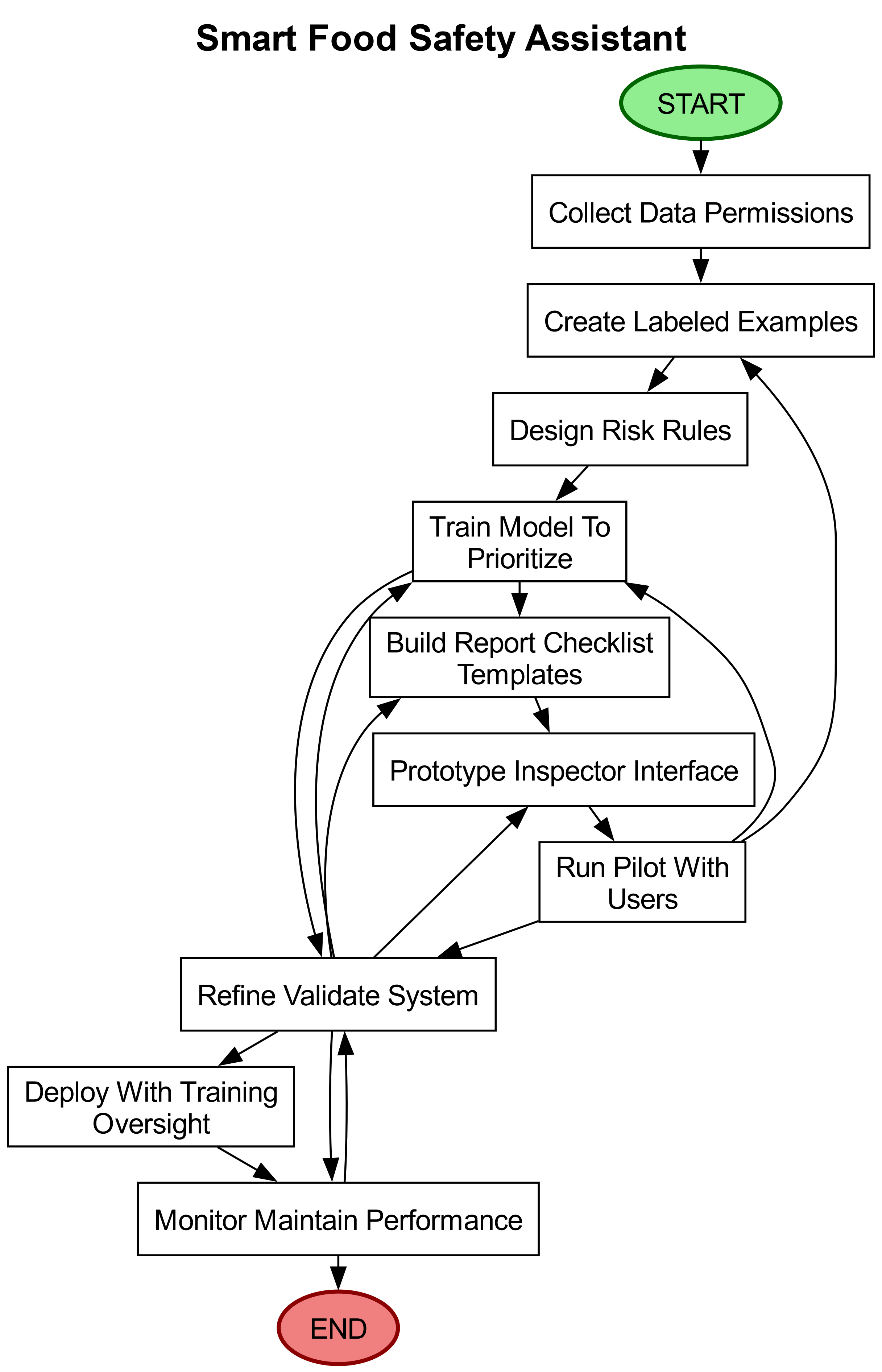
Gather data and permissions: Collect historical inspection records, labeled photos of common problems (e.g., pests, spoilage), and time-stamped sensor feeds (temperature, humidity). Obtain consent from inspected sites and anonymize any customer or employee faces or personal information before use.
Create a labeled example set: Work with experienced inspectors to mark up images (location of contamination, problem type) and link them to sensor events and past outcomes. Capture short notes explaining why an item was marked to build the AI’s context.
Design simple risk rules and examples for the AI: Combine straightforward human rules (e.g., temperature above safe limit increases risk for that zone) with the labeled examples so the system can learn patterns that predict high-risk areas and likely causes.
Train the AI to recognize issues and prioritize: Use the labeled examples to teach the AI to identify visible problems in photos, correlate them with sensor anomalies, and score areas by predicted risk so inspections can be routed to highest-risk spots first.
Build report and checklist templates: Create templates that turn AI findings into ready-to-submit compliance reports with annotated images, a plain-language summary, step-by-step remediation guidance, and an inspector checklist tailored to the facility type.
Prototype the inspector interface: Develop a simple app or web view where inspectors can see prioritized routes, annotated photos, sensor timelines, suggested fixes, and buttons to accept, edit, or reject each finding before including it in a report.
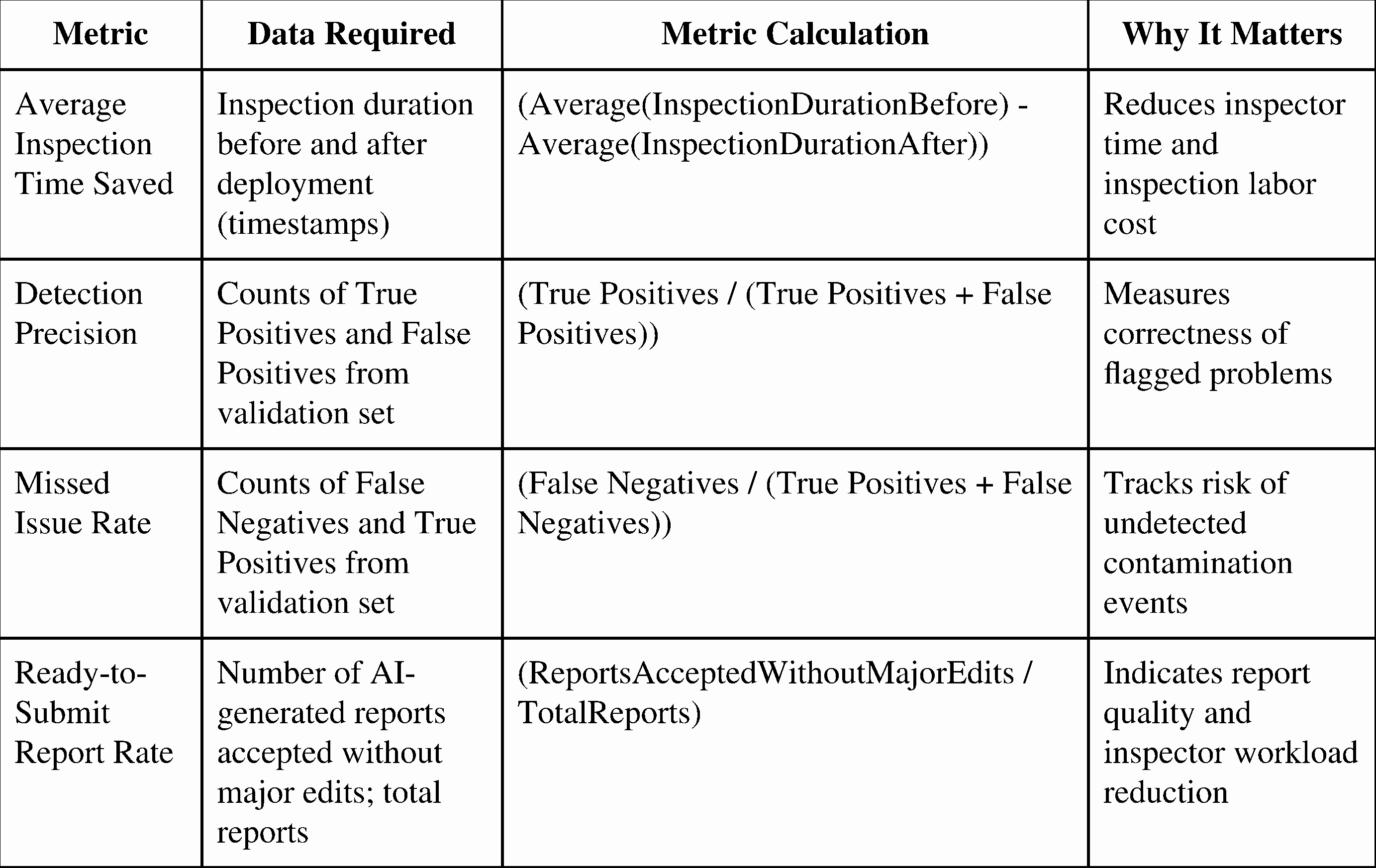
Pilot with target users: Run a small pilot with inspector teams and facility managers. Gather feedback on detection accuracy, report clarity, routing usefulness, and time saved. Ask inspectors to correct AI annotations to improve the system.
Refine and validate: Improve the AI based on pilot feedback, expand the labeled examples, tune the risk scoring, and validate that reports meet local regulatory formats. Have legal or compliance staff review report wording and required fields.
Roll out with training and oversight: Deploy the assistant to inspection teams, provide short training sessions, and require human review and sign-off of all inspection reports before submission. Set up a simple process for inspectors to flag mistakes for root-cause fixes.
Monitor and maintain: Regularly review performance (missed issues and false alarms), update the labeled examples with new problem types, rotate training material, and schedule periodic audits to ensure the assistant remains accurate and compliant.
Impact Metrics
Human-in-the-Loop
Experienced inspectors must label images and explain decisions to train the AI effectively.
Compliance and legal staff must approve report formats, wording, and regulatory adherence before submission.
Inspectors must review, correct, and sign off on every AI-generated finding and report to ensure accuracy and accountability.
Facility managers provide sensor access and consent, enabling data collection for risk assessments.
Operations staff track performance, gather user feedback, and prioritize improvements to maintain system reliability.
Things to Watch For
Privacy of images and sensor data: Photos may capture staff or customers, and sensor streams can reveal sensitive operational details. Data must be anonymized and access controlled.
Missed detections or incorrect risk scores: The assistant may overlook contamination or provide false reassurance. Inspectors must not rely on it alone and should review all findings before acting.
Regulatory and legal liability: Inspection reports can have legal consequences. Output must be reviewed and approved by humans and verified to meet local reporting rules before submission.
Key Takeaways
AI augments, not replaces, human expertise: The assistant enhances inspector efficiency and consistency but requires human oversight to ensure accuracy and compliance.
Proactive risk detection saves time and lives: By prioritizing high-risk zones and automating report generation, the tool reduces outbreaks and operational costs.
Continuous improvement is critical: Regular updates to training data, risk models, and report templates ensure the system adapts to new challenges and regulatory changes.
Disclaimer: The idea discussed here reflects a potential application of AI. It is intended for exploration and inspiration. Actual implementation may vary.
About the author: I help organizations identify and implement high-impact AI opportunities.